

Security
Your data stays behind your own walls
MantleOS runs on a server you control. Your documents, your chats and your keys stay there, not on a vendor’s cloud. Around that data are seven layers of protection, one inside the other, each built to hold if another fails.
Scroll down and walk in from the street. Each stop says what it does for you, in plain words, with the technical detail underneath for whoever signs off the install.
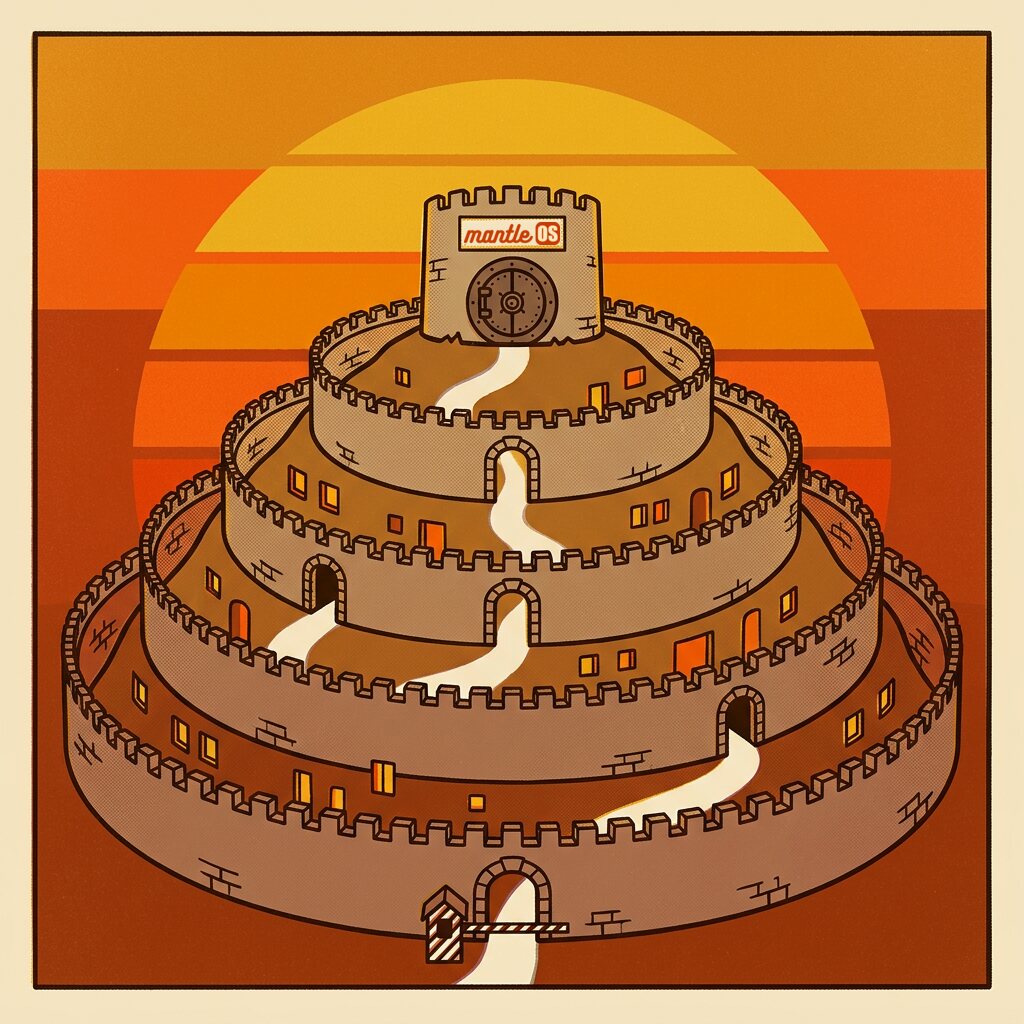
Seven strongholds
Walk in from the street
Each wall is built to hold if the one before it fails. Follow the card along the road.
Stronghold 1
The road to your server is sealed
Give your server a domain name and it gets its own certificate from Let’s Encrypt, a free public authority browsers already trust. It renews by itself, with no one to remind. After the first visit, the browser goes straight to the sealed road on every later visit.
Stops Anyone on the network reading or changing what travels between you and the server.
Caddy runs ACME (HTTP-01 and TLS-ALPN-01) and serves HTTPS and HTTP/3. HSTS max-age=31536000 on TLS responses, this host only.
Stronghold 2
There is one door in
Only the front door listens on the network. The database, the file store and the background workers have no door of their own, so there is nothing else to knock on. The door’s log blanks out sign-in codes, invite codes and call tokens.
Stops A stranger reaching the database or file store directly.
Only Caddy publishes ports 80 and 443. The debug port binds 127.0.0.1. Every other part sits on the internal Docker network. An optional calls service opens its own media ports when you switch it on.
Stronghold 3
Everyone is asked who they are
The app, the phone, an API key, an AI client, an assistant and a public link all pass one gate. It names the caller, finds the rule for what they want to do, and refuses a route that has no rule. End a login, and every copied session stops on its next request.
Stops Password guessing, a forgotten check on one route, and a stolen session that lives on.
Eight gate steps on every way in. bcrypt cost 12, a dummy hash for unknown emails, per-address rate limits, signed sessions compared to session_epoch on each request. MCP clients use OAuth with PKCE S256, single-use codes and hashed tokens.
Stronghold 4
Only your rooms open
A login has no rights of its own. You read what is shared with the workspaces you are in, and the database enforces that, not the screen. Admins run the server, yet they read only what their own workspaces hold. An Admin who joins a workspace to read it leaves a record. An item you may not see looks as if it never existed.
Stops A bug in one screen or tool showing someone the wrong row.
Postgres row level security on a limited role, set per transaction with the actor and its scope. A hidden row is absent, and a read answers 404, the same as a random id.
Stronghold 5
The assistant carries a badge too
An assistant works under the same rules as a person. It can use only the tools you gave it, and it reads only its workspace, unless an Admin chooses to expose email and journal. An action marked for approval waits for a person to say yes. Text from an email or a page arrives fenced as data. A model can still be fooled by it, so the limit is what holds: the assistant cannot go past its tools and rights.
Stops A model that has been talked into something going past its grant.
Tool groups are checked on the server on every call. Confirmed tools queue under Pending. An approved call is judged again with the asker’s rights at that moment. Outside text is fenced as untrusted data.
Stronghold 6
Untrusted work happens in sealed rooms
A mini app, a piece of code the assistant runs and every file you upload are treated as strangers, even when they came from you. Each gets a room with thick walls and one small hatch, built to keep a bad file or a bad package inside. Two things work outside these rooms: the Terminal tool, which the Coder assistant ships with, and any shell tool you add. Both run on the server itself, so grant them only to an assistant you would hand a shell.
Stops A hostile file, a bad package or a broken app reaching your data.
Apps: sandboxed iframes with an opaque origin. Code: containers on their own network. Files: a parser with no route out. Containers share the host’s kernel, so a kernel exploit is out of scope. The table further down shows what each one can reach.
Stronghold 7
Keys stay in the vault
Passwords and API keys are sealed before they are stored. An assistant can find a stored key by its description and use it through a handle, without seeing the value. A stored key stays out of tool definitions, traces and chats. One caution: a key typed into a chat passes through the model first, so use the Keys screen.
Stops A copied database, a leaked log or a nosy model giving up your credentials.
AES-256-GCM with per-row additional data, so a value cannot be moved to another row. The master key lives in .env, outside the database. API keys, invite codes and OAuth tokens are stored hashed. Every write from the Keys screen or an api_key tool goes through one gateway and leaves one audit row.
Between workspaces
A door between two rooms stays shut until a grant opens it
Teams keep their work in workspaces, and nothing crosses from one to another by accident. The only live way across is a grant, and the database checks it on every read and every change. A person who may read an item can still save a copy, as with any document. Try it: this panel asks the same questions the database asks.
Plant
The item’s home
Finance
Another workspace
Set the switches, pick a person, then press Try it.
An item has one home
Every item lives in exactly one workspace. Its people read it, and its Moderators decide where else it goes.
Sharing is a grant, with a Write switch
A grant opens an item to one other workspace. Reading comes with the grant. Changing needs the Write switch as well.
One person must hold both keys
Adding a grant, or turning Write on, needs one person who may manage the item’s home and moderates the workspace receiving it. A Moderator of either side can take it back alone.
Nothing is shared by itself
The one exception: an item placed in a shared folder takes the folder’s grants, and the dialog says so before you confirm.
How it is built, from the request down to the row
A permission that lives in a screen can be forgotten by the next screen. So this one lives in the database, under every screen, every tool and every AI client.
Every statement carries a name
Each database statement states who it runs for and which workspaces it may touch. A statement with no name is refused.
Actor and scope are set with a transaction-local set_config on the first statement, never a session SET. The actor check runs as a trigger on every item table.
Three roads into the database
Reads take one road, writes take another, and system work takes a third that must give its reason.
mantle_view_user for reads in a scope, mantle_write_user for writes, the system pool for named work. In a scope, system work runs on mantle_system_narrow, which writes no item outside a named full-route spot.
Row rules decide what exists
The rule sits on the table itself. A tool that forgets to check still gets no wrong row back, because the row is not there for it.
Postgres row level security on the workspace and write roles. A hidden row is absent, never an error.
Each write proves it may write
Changing an item checks the grant’s Write switch or the Moderator tick inside the same statement. A miss changes nothing.
The edit check: per-table checks on the write role and a read-only refusal. A check that misses answers 42501, and the mapper turns it into a 403 or a 404.
Who is in a workspace is guarded twice
On a new install, the app’s own database login cannot write the membership tables at all. Each change goes through a guarded function, which checks the login the app names and writes the record in the same step.
workspaces, workspace_users, workspace_events and workspace_resources are read only to mantle_runtime, so each write is a definer call. Grants go through mantle_grant_change. New installs log in as mantle_runtime, which is no superuser and owns no table, so it cannot switch a trigger off. An older box opts in with MANTLE_DB_RUNTIME_ROLE=1.
The checks stay on
Turning a check down needs an operator’s stated reason and leaves a record. Until it is back, every process logs a security line.
mantle_set_check(setting, mode, tries, reason). Migrate raises a box with no recorded reason back to on.
Isolation
Strangers work in sealed rooms
MantleOS treats its own mini apps, the code its assistant runs and every file you upload as untrusted, even when they came from you. Each one works in a room with a single hatch, and the server decides what passes through it.

A mini app
Small tools built inside MantleOS
iframe sandbox="allow-scripts", CSP sandbox and connect-src none. One postMessage bridge. Only the tools declared on the app run, on the server. One SQLite per app, no ATTACH. A statement runs 5 s at most and returns 50,000 rows and 8 MB at most.
A code sandbox
Where the assistant runs code
A container with all capabilities dropped but the seven apt needs, no-new-privileges, 1 GB, 1 CPU, 512 processes. Three network tiers: open, an allowlist proxy, or none. No route to Postgres, the object store or web.
The file reader
Opens every file that comes in
mantle-parser: internal network with no NAT and no DNS, read-only disk, no capabilities, no new privileges, an unprivileged user, a memory cap and one job at a time. A file built to hurt its reader dies in here.
A public link
One item, shared with anyone
About 128 bits of random token in the URL, which you can turn off. It reaches no brain tools, and a public app is read only on its own database.
An app holds no secrets
Keys resolve on the server, so the app’s code never sees one. A shared app can never hand a visitor a server call under your account.
An app reads what every holder may read
People who run an app share its database. So an app held by a team runs at the team’s rules for everyone, an Admin’s run included.
The record
Every change leaves a line in the book
When someone asks who changed this and when, you open the book and read it. Each line names the real person, the assistant or the AI client, never a shared account. Each person acts as themselves, so a name in the log means that person.

Settings > Audit logExample rows
- 08:02:14plant.supervisorauth.loginsigned in from the office
- 08:03:51unknownauth.login_failedwrong password, address kept
- 08:11:06plant.supervisorapi.writechanged a page
- 09:27:40it.adminkey.createda key, named, value never kept
- 10:15:22finance.leadoauth.consentallowed an AI client
- 10:15:23finance.leadoauth.code_exchangedthe client got its grant
- 11:42:09it.adminuser.updateended a login’s sessions
- 13:06:58old.deviceauth.token_reusea used token came back, sessions ended
The audit log
Who did what, and when: sign-ins and failed tries, changes to a login, keys made or refused, and each write through the app or a tool. It keeps the person’s name after their login is deleted.
Traces
An Admin can open the turns that answered them and read them step by step: the prompt, each tool call and its result, the model, the tokens, the cost and the time. Another person’s turns stay closed. Vault keys a call used are swapped back to their references.
The workspace record
Every change to who is in a workspace, who moderates it and what is granted to it, written in the same step as the change.
The AI client log
A row for nearly every tool call an MCP client makes, with its arguments redacted and capped. Each login sees its own rows, and rows are kept for 90 days.
App activity
Each app has an Activity tab that names the person behind each run, so a shared tool never hides who used it.
The door’s own log
A line for each request that reaches the front door, and how it ended. Sign-in codes, invite codes and call tokens are blanked, and the Referer header is dropped.
Backups
A bad day has a way back
Disks fail and people press the wrong button. MantleOS packs four parts into one set, checks the database dump, and refuses to update your server without a fresh set.
- The database
- Every app’s database
- The table workbooks
- Personal files
Four parts, taken together
On a schedule you set
Turn backups on, pick daily or weekly and how many to keep. A half-written backup can never be mistaken for a good one. They are off until you turn them on.
pg_dump -Fc to a .part name, checked for the PGDMP magic bytes, then promoted. Rotation touches only its own files. Default: daily at 02:00, keep 7.
Before every server update, or no update
A server update through the updater takes a four-part backup first. If the backup fails or the disk is too small, the update stops with nothing changed, and the reason is on the Updates page. A request from the app cannot skip this.
The updater runs db-dump.sh in strict mode into backups/pre-roll/, mode 0600, keeps three sets and checks free disk first. Only an operator can turn it off, in .env.
Small mistakes have small fixes
Apps and tables keep their own history, so you can step one back without touching the rest. An app gets a snapshot by itself before a restore, and a deleted app waits under Recently deleted.
App snapshots hold the code and a copy of its database. A table commit keeps the workbook it replaces. App databases run in WAL mode and are copied with VACUUM INTO, consistent under load.
A restore checks its own work
The restore script refuses a database that holds any item or login, and it checks the logins and the access rules before it says yes. It tells you plainly whether the result is good.
scripts/db-restore.sh exits 0 when good, 2 when not usable and 3 when part of the dump did not restore.
People change
When someone leaves, their access goes with them
One click, next request
Disable a login or press Sign out everywhere, and every session and device token stops on its next request.
Keys end with the login
An API key acts as the login that made it, as that login is now. A password change or a sign out everywhere ends the login’s keys as well.
Later work is judged later
A scheduled job or an approved action runs with the person’s rights at the moment it runs. If their access has gone, it is refused.
Sign in with your company account
We are finishing sign-in through any OpenID Connect provider, such as Keycloak, Okta, Authentik or Entra ID. It switches on and off, and with it off nothing changes and no provider is called. A person is linked to a login once, never matched on an email address, and a company sign-in never creates a login or an admin.
This is not in a release yet. It is in review on a public branch, and this line changes when it ships.
Authorization code with PKCE S256, state and nonce. MANTLE_OIDC_MODE off, optional or required, set in .env only, so an admin cannot turn it off from the app. Sessions from it last 12 hours by default.
Outbound
What leaves your server
Almost everything stays home. These are the ways out, and most of them start only when you connect an account or switch a feature on.
What you send to AI providers
Prompts, passages and any text, images or audio you route to the providers you set up. With local models, none of it leaves.
Mail you send
Through your own mail account.
Telegram and calls
Messages on a bot you paired, and call media once you switch calls on.
Connectors you add
Calls to the outside tools you connected, with only that call’s arguments.
Web searches and fetches
Queries and page requests the assistant makes. A fetch cannot reach private or cloud metadata addresses.
Code sandboxes
Internet traffic at the network tier chosen when the sandbox is made. Fresh installs include sandboxes, and the open tier is the default.
Linked brains and tailnets
Questions and answers with brains you added, and the Tailscale helper’s traffic, which carries your content only once an admin activates it.
Phone notifications
Sealed for the device before they leave, once a phone connects.
Housekeeping
Update checks with version numbers only, certificate renewals, image downloads for an update, model list checks with your providers, a nightly look at public package versions, and startup logs from the Tailscale helper, which hold system details, not your content.
Plainly
Four things stay your job
You run this server, and that gives you control. It also leaves a few jobs that no software can do for you.
Keep one copy of .env off the server
It holds the master key. Lose it and the sealed keys in your backups are gone for good. Keep it apart from the backups, so one theft cannot take both.
Copy backups off the server
MantleOS writes to the server only. Copy the backups, your files and the attachments somewhere else. One rsync covers all three.
Look after the machine
Disk encryption, host updates and who has shell access are yours. Anyone with root on the server has your data.
Use a second brain for a hard wall
People in a workspace can see all it holds. Groups that must not share admins need separate brains, so one mistake stays inside one install.
Check it yourself. Every line of it is public.